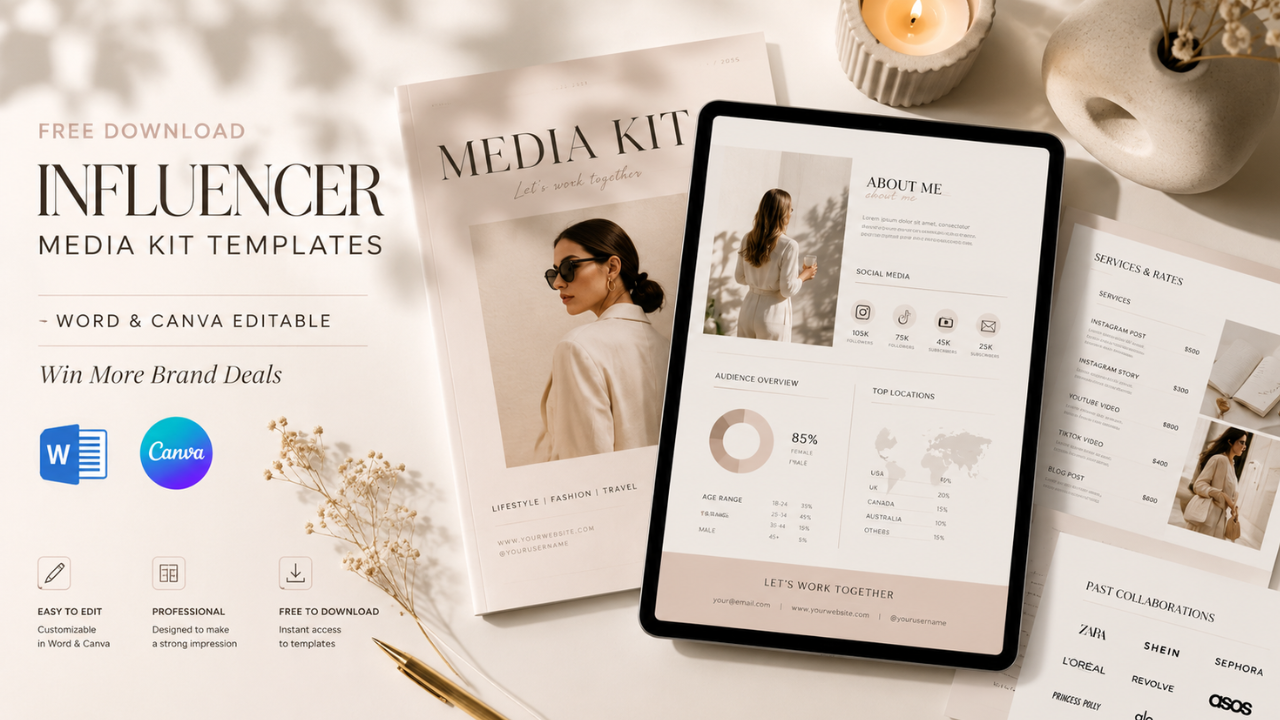
Looking for a free influencer media kit template? This guide explains what an influencer media kit is, why it matters, what to include, and how to customize free Word and Canva templates to create a professional presentation that attracts brands and partnership opportunities.
What is an Influencer Media Kit?
An Influencer Media Kit is a professional document that introduces you to potential brand partners. It summarizes your personal brand, audience demographics, social media performance, previous collaborations, content style, and contact information in one easy-to-read format.
Think of it as a digital portfolio. Instead of sending multiple screenshots and lengthy emails, you can present everything a brand needs to evaluate your profile in a single document.
Today, many creators use Word and Canva templates because they are easy to edit, visually appealing, and suitable for beginners as well as experienced influencers.
Whether you’re a TikTok creator, Instagram influencer, YouTuber, blogger, or UGC creator, a polished media kit helps you appear more credible and prepared for professional collaborations.
Main Benefits of Free Influencer Media Kit Templates
- Save hours by starting with a ready-made layout.
- Present your brand professionally to potential clients.
- Highlight audience statistics in a clean, organized format.
- Increase credibility during sponsorship negotiations.
- Easily customize colors, fonts, and branding.
- Suitable for Word, Canva, and PDF exports.
- Improve response rates when pitching brands.
- Reuse the same template for multiple partnership proposals.
Complete Guide to Influencer Media Kit Templates (Step-by-Step)
Step 1: Preparation
Before editing your media kit, gather the information that brands care about most.
Prepare:
- Professional profile photo
- Personal or creator logo (optional)
- Short biography
- Social media usernames
- Follower counts
- Average engagement rate
- Audience demographics
- Monthly impressions
- Previous brand collaborations
- Content categories
- Pricing (optional)
- Email address
- Website or portfolio links
Keep your data updated. Outdated follower counts or inaccurate engagement metrics can reduce your credibility.
Step 2: The Main Process
A strong influencer media kit usually includes the following sections.
1. Cover Page
Include:
- Your name
- Creator title
- Professional photo
- Social media handle
Keep the design clean and visually consistent with your personal brand.
2. About Me
Introduce yourself in one or two short paragraphs.
Mention:
- Your niche
- Your content style
- Your mission
- The value you provide to your audience
Avoid making the section too long. Brands want a quick overview.
3. Audience Insights
This is one of the most important sections.
Include information such as:
- Age groups
- Gender distribution
- Top countries
- Top cities
- Audience interests
Brands use these insights to determine whether your audience aligns with their target market.
4. Social Media Statistics
Present key performance metrics for each platform.
Examples include:
- Followers or subscribers
- Average reach
- Monthly impressions
- Average views
- Engagement rate
Use simple charts or icons to make the data easy to understand.
5. Previous Brand Collaborations
Showcase companies you’ve worked with.
If you’re new to influencer marketing, include examples of your best-performing content instead. Strong organic performance can still demonstrate your value to potential partners.
6. Content Services
List the services you offer, such as:
- TikTok videos
- Instagram Reels
- Stories
- Carousel posts
- YouTube Shorts
- Dedicated YouTube videos
- Product photography
- UGC videos
- Blog articles
- Affiliate promotions
This helps brands quickly identify the collaboration formats you provide.
7. Portfolio
Include screenshots or thumbnails of your best-performing content.
Choose examples that demonstrate:
- High engagement
- Strong storytelling
- Professional editing
- Creative visuals
Quality matters more than quantity.
8. Contact Information
End your media kit with clear contact details.
Include:
- Email address
- Website
- Portfolio
- Social media links
Make it easy for brands to reach you.
Step 3: Result & Evaluation
Once your media kit is complete, export it as a PDF before sending it to brands. PDF formatting remains consistent across devices and looks more professional.
Review and update your media kit every one to three months by refreshing:
- Follower counts
- Engagement metrics
- Audience insights
- Brand collaborations
- Portfolio examples
Keeping your media kit current shows professionalism and ensures brands receive accurate information when evaluating your profile.
Comparison Table / Data Summary
| Format | Best For | Advantages | Limitations |
|---|---|---|---|
| Canva Template | Beginners & designers | Modern, highly customizable, easy to share | Some design elements require Canva Pro |
| Microsoft Word | Simple editing | Familiar interface and quick updates | Fewer advanced design options |
| PDF Export | Brand proposals | Professional appearance and consistent formatting | Editing requires returning to the original file |
| Google Docs | Team collaboration | Accessible from any device | Limited visual customization compared to Canva |
Additional Tips for Maximum Results
- Keep your media kit between 4 and 8 pages. Include only information that supports your value as a creator.
- Use consistent colors, typography, and imagery to reinforce your personal brand.
- Replace outdated analytics regularly so brands always see your latest performance.
- Tailor your media kit for different industries by emphasizing the audience insights and portfolio examples most relevant to each brand.
Frequently Asked Questions (FAQ)
1. Is a media kit necessary for small influencers?
Yes. Even creators with a smaller audience can benefit from a professional media kit. Many brands prioritize engagement, niche relevance, and content quality over follower count.
2. Should I include my pricing?
It depends on your strategy. Some creators include starting rates, while others discuss pricing after learning about the campaign requirements.
3. Can I create a professional media kit for free?
Absolutely. Free Word and Canva templates provide an excellent starting point and can be customized to match your branding without additional design software.
Conclusion & Call to Action
A well-designed influencer media kit is more than a résumé—it’s a marketing tool that helps brands understand your value quickly and professionally. By using a free Word or Canva template, keeping your information up to date, and showcasing your strongest content, you’ll be better prepared to secure sponsorships and long-term collaborations.
If you found this guide helpful, share it with fellow creators, and explore our other resources on influencer marketing, TikTok growth, Instagram strategies, affiliate marketing, and content creation to strengthen your personal brand and attract more partnership opportunities.