 Want to automate your technology blog without writing custom code? This step-by-step n8n tutorial shows you how to build an automated publishing workflow that collects content, processes it, and publishes articles to your blog, helping you save time and maintain a consistent publishing schedule.
What is n8n?
n8n is an open-source workflow automation platform that connects apps, APIs, databases, and online services through visual workflows. It enables users to automate repetitive tasks without extensive programming knowledge, making it a popular choice for bloggers, developers, marketers, and businesses.
Unlike many automation platforms, n8n offers self-hosting options, extensive customization, and hundreds of built-in integrations. You can connect services such as WordPress, Google Sheets, Notion, RSS feeds, GitHub, Slack, email providers, cloud storage, and AI platforms into a single automated workflow.
For technology bloggers, n8n can automate content collection, AI-assisted drafting, SEO optimization, image processing, notifications, and article publishing, allowing you to focus on creating valuable content instead of managing repetitive tasks.
Main Benefits of n8n for Blog Automation
Automating your publishing process provides more than convenience. It helps improve consistency, productivity, and scalability.
Key Benefits
- Reduce manual publishing tasks.
- Save hours of repetitive work every week.
- Publish articles on a consistent schedule.
- Connect WordPress with hundreds of external services.
- Automatically generate SEO metadata.
- Receive notifications when workflows complete or fail.
- Integrate AI tools for drafting and content enhancement.
- Process images before publishing.
- Synchronize content across multiple platforms.
- Scale your content strategy without increasing workload.
Complete Guide to n8n Blog Automation (Step-by-Step)
Step 1: Preparation
Before building your automation workflow, prepare the necessary tools and resources.
You should have:
- An installed and accessible n8n instance (self-hosted or cloud).
- A technology blog, such as a WordPress website.
- API credentials or authentication for the services you plan to connect.
- A source for your content, such as Google Sheets, Notion, Markdown files, or an RSS feed.
- Featured images stored in a cloud service or local storage.
- A clear publishing schedule and content plan.
Planning the workflow in advance makes automation easier to maintain and troubleshoot.
Step 2: The Main Process
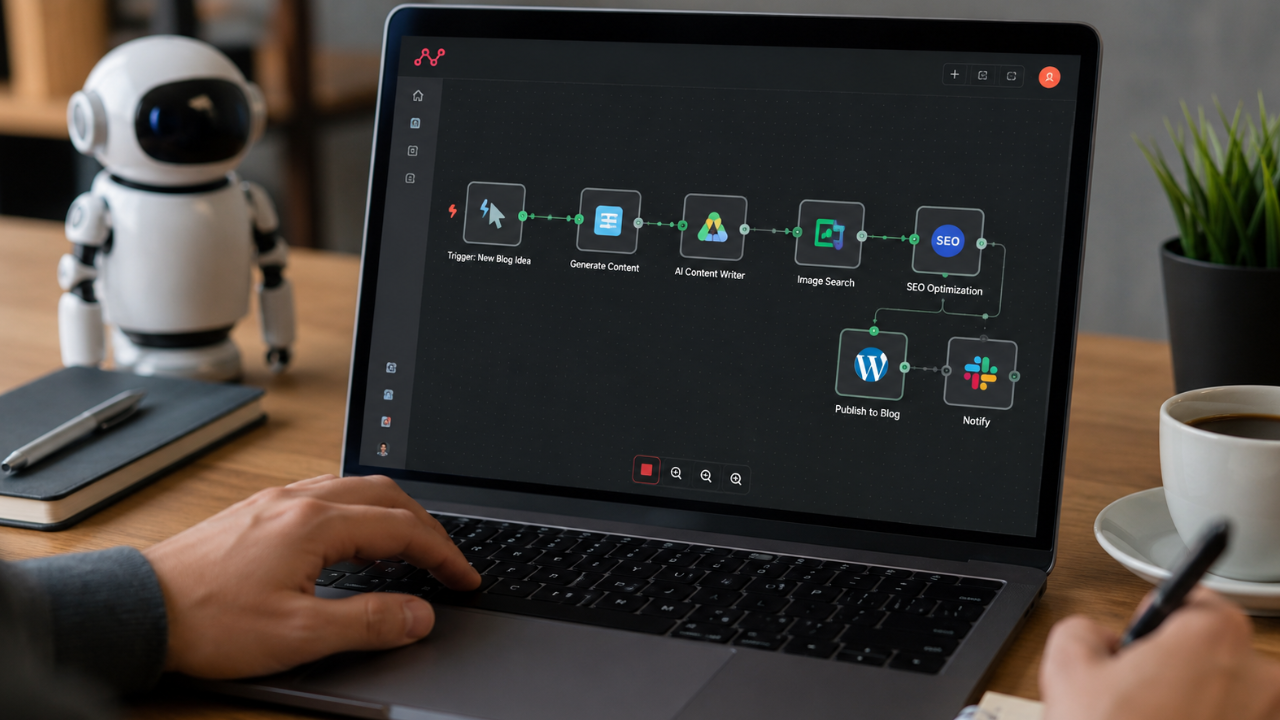
A typical automated publishing workflow in n8n follows these steps.
1. Choose a Trigger
Every workflow begins with a trigger. Common options include:
- A scheduled trigger that runs every morning.
- A webhook triggered by another application.
- A new row added to Google Sheets.
- A new page created in Notion.
- A new Markdown file uploaded to cloud storage.
The trigger determines when the automation starts.
2. Retrieve Article Content
Next, fetch the article data from your preferred source.
Examples include:
- Google Sheets
- Airtable
- Notion
- CMS databases
- Git repositories
- RSS feeds
- Internal APIs
The retrieved data may include the title, content, category, tags, featured image URL, publication date, and author information.
3. Process and Optimize Content
Before publishing, improve the article automatically.
Your workflow can:
- Format headings consistently.
- Clean unnecessary HTML.
- Generate SEO-friendly slugs.
- Create meta descriptions.
- Assign categories and tags.
- Validate required fields.
- Optimize featured images.
- Generate summaries.
- Prepare social media captions.
Some publishers also integrate AI services to assist with proofreading, rewriting, or generating excerpts. Regardless of the tools you use, always review content for accuracy and editorial quality before publishing.
4. Publish to WordPress
Once the article is ready, use the WordPress integration or REST API to create a new post.
Typical fields include:
- Title
- Content
- Featured image
- Categories
- Tags
- Slug
- Excerpt
- Publication status
- Author
You can publish immediately or schedule the article for a future date.
5. Notify Your Team
After publishing, send notifications through:
- Slack
- Discord
- Microsoft Teams
- Telegram
Notifications help editors verify successful publication and quickly identify workflow failures.
6. Record Activity
Store publishing logs for future reference.
Useful information includes:
- Publication time
- Post URL
- Workflow status
- Error messages
- Processing duration
Keeping detailed logs simplifies troubleshooting and performance monitoring.
Step 3: Result & Evaluation
Once your automation is running, evaluate its effectiveness regularly.
Monitor:
- Publishing success rate
- Workflow execution time
- Failed automation runs
- API response errors
- Content formatting consistency
- SEO metadata quality
- Website performance after publishing
- Team productivity improvements
Refine the workflow as your blog grows or your editorial process changes.
Comparison Table / Data Summary
| Automation Method | Setup Difficulty | Flexibility | Maintenance | Best For |
|---|---|---|---|---|
| Manual Publishing | Very Easy | Low | High | Small blogs |
| WordPress Scheduled Posts | Easy | Medium | Low | Individual bloggers |
| Basic Automation Tools | Easy | Medium | Medium | Small businesses |
| n8n Workflow Automation | Medium | Excellent | Low | Growing blogs |
| Custom API Development | Advanced | Very High | High | Large organizations |
Additional Tips for Maximum Results
To build reliable automation workflows, follow these best practices:
- Break large workflows into smaller, reusable modules to simplify maintenance and debugging.
- Add error handling and notifications so failures are detected immediately instead of going unnoticed.
- Test every workflow with draft posts before enabling automatic publishing on your live website.
- Keep API credentials secure and review integrations regularly to ensure compatibility after software updates.
Frequently Asked Questions (FAQ)
Is n8n free to use?
Yes. n8n is open source and can be self-hosted at no cost. It also offers managed cloud plans for users who prefer not to maintain their own infrastructure.
Can n8n publish directly to WordPress?
Yes. n8n can publish content using the WordPress integration or the WordPress REST API, allowing you to create, update, or schedule posts automatically.
Do I need programming experience to use n8n?
Not necessarily. Most workflows can be built using n8n’s visual interface. However, basic knowledge of APIs, JSON, or JavaScript can be helpful for more advanced automation.
Conclusion & Call to Action
n8n is a powerful automation platform for technology bloggers who want to streamline their publishing process, reduce repetitive work, and maintain a consistent content schedule. With the right workflow, you can automate everything from content collection to publication while keeping editorial control over your articles.
If you found this tutorial helpful, share it with fellow bloggers or developers, and explore more automation guides, SEO tutorials, and productivity resources on Soxvo to build a smarter and more efficient blogging workflow.